
Jun 17, 2026 · Cloud Computing
Scheduling Computing Workloads: Kubernetes as an Example
Scheduling is the process of deciding where and when workloads should run when resources are limited. This post explains the core ideas behind workload scheduling and uses the Kubernetes scheduler as a practical example.
Scheduling workloads and processes has always been one of the core concerns of computer science. Operating systems schedule processes on CPUs, network systems schedule data flows across links, and distributed platforms schedule workloads across machines.
At its simplest, scheduling is the act of assigning limited resources to tasks. The resources can be processors, memory, network links, storage devices, or machines. The tasks can be threads, processes, containers, pods, jobs, or data flows.
Problem Statement
Given a set of workloads and a pool of limited resources, decide where and when each workload should run.
This problem is not specific to computing. Resource management is one of the oldest problems humans have tried to solve: we have limited time, space, energy, money, and tools, but we still need to get work done.
Computing is no exception. CPU, memory, storage, and network capacity are limited, so we try to use them effectively. Sometimes we optimize the software itself. Sometimes we build algorithms that decide which workload should run, where it should run, and when it should start. That decision-making process is scheduling.
Two important concepts usually appear in this context:
- Preemption: stopping or moving a lower-priority workload so a higher-priority workload can run.
- Eviction: removing a workload from a resource, often because the resource is under pressure, unavailable, or no longer a valid placement.
Common Scheduling Algorithms
Once we define a scheduling problem, the next question is usually: which policy or algorithm should guide the decision?
There are many scheduling algorithms, and most real systems combine several of them. Here are a few common examples:
- FIFO (First In, First Out): workloads are handled in the order they arrive. It is simple, predictable, and easy to implement, but it can cause small or urgent workloads to wait behind larger ones.
- Round Robin: each workload gets a time slice in turn. This is useful when fairness and responsiveness matter, especially in operating systems.
- Priority Scheduling: workloads with higher priority are scheduled before lower-priority workloads. This is useful for critical tasks, but it must be designed carefully to avoid starving low-priority work.
- Bin Packing: workloads are placed to use resources as densely as possible. This can improve utilization and reduce waste.
- Spreading: workloads are distributed across resources to reduce concentration and improve resilience.
- Fair Share: resources are divided fairly between users, teams, queues, or tenants so one group cannot consume everything.
In practice, a scheduler may combine more than one policy. For example, it might use FIFO to pick the next workload from a queue, priority rules to decide whether it should be admitted, and spreading or bin packing to choose the final machine.
Deep Dive: Filter and Score
One of the most common scheduling strategies is filter and score.
After the scheduler picks the next workload from the queue, it first filters the available resources. This filtering phase removes machines that cannot run the workload because of hard constraints, such as missing CPU, unavailable memory, incompatible labels, unavailable ports, or explicit placement rules.
After the resource pool is reduced to feasible candidates, the scheduler scores the remaining machines. Scoring uses softer preferences, such as better resource balance, lower cost, topology spread, locality, or custom business rules. The workload is then assigned to one of the highest-ranked candidates.
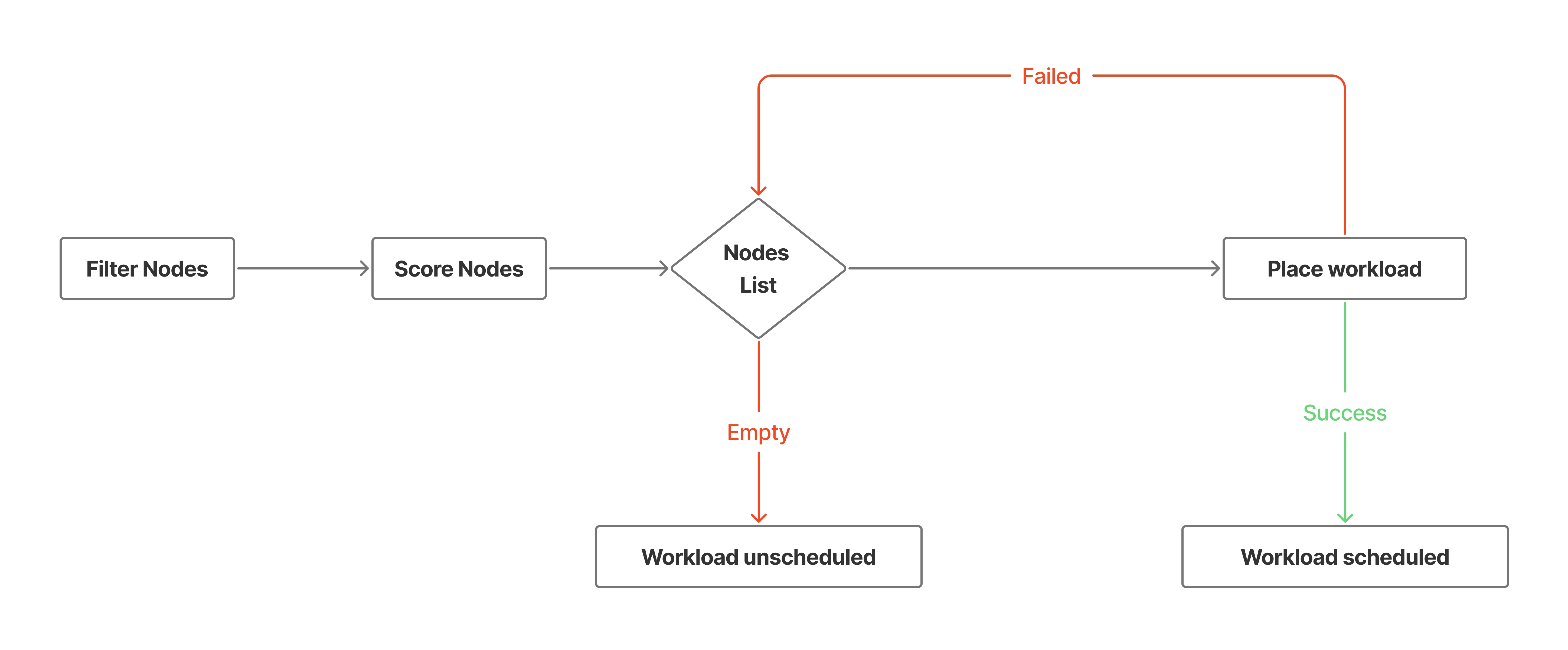
The interesting part about this strategy is that it is naturally extensible. You can stack several filtering and scoring functions. Each function receives the workload, the candidate resources, and a set of constraints, then returns a smaller list of candidates and a score for each candidate.
That structure also creates useful extension points. A scheduler can expose hooks before filtering, after filtering, before scoring, after scoring, during binding, or after binding. Users can then add custom behavior without rewriting the whole scheduler.
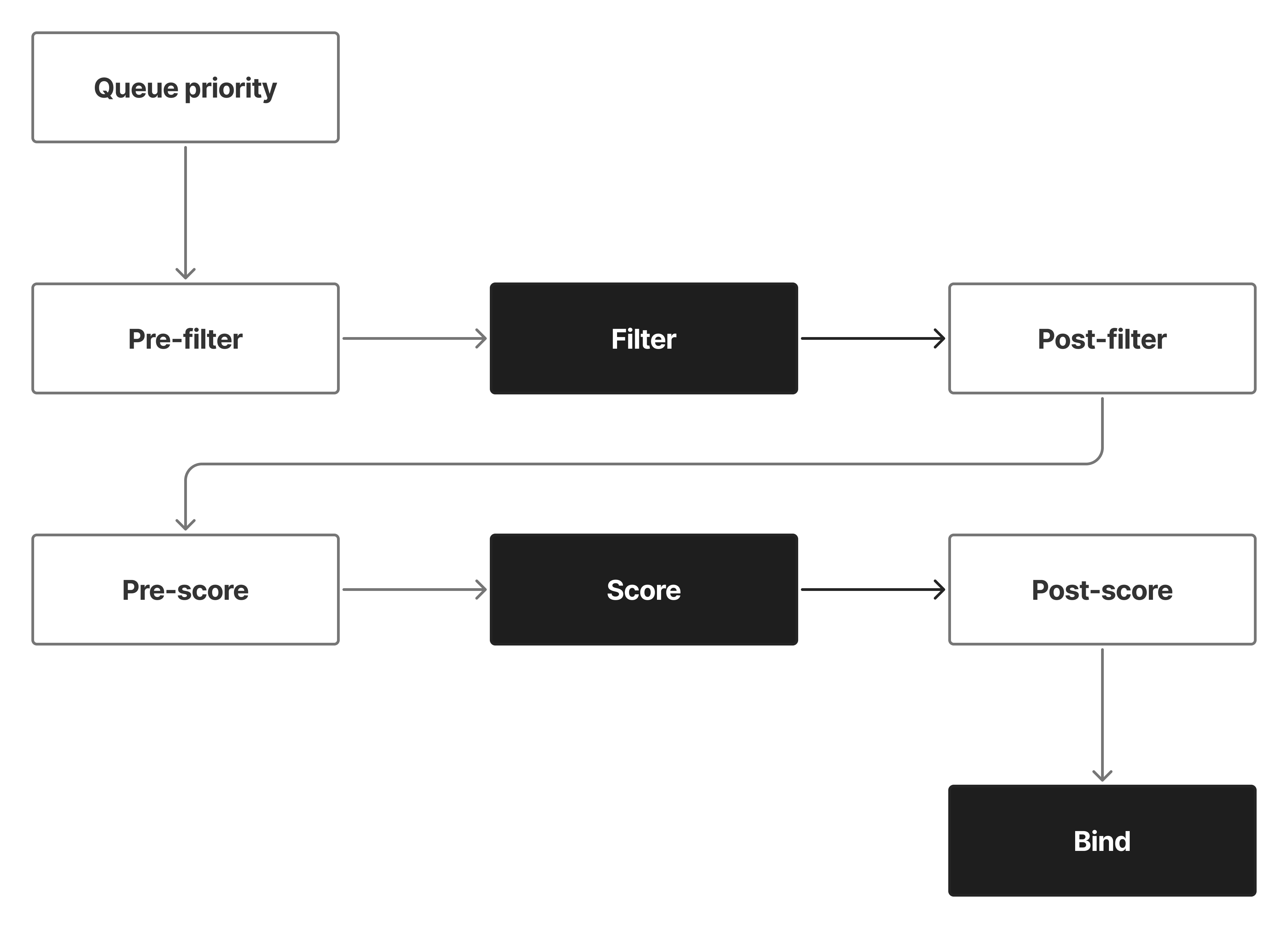
If you are designing your own scheduler, this is an important architectural lesson: keep the scheduler closed for unnecessary modification but open for extension. Let users add filters, scorers, weights, and binding logic through well-defined interfaces.
Example: Kubernetes Scheduler
One well-known example is the Kubernetes scheduler.
Kubernetes is a container orchestration platform. Its job is to help run containerized applications across a cluster of machines. In Kubernetes terminology, the scheduler decides which node, physical or virtual, should run a Pod. You can think of a Pod as the smallest schedulable unit in Kubernetes, usually wrapping one or more containers.
When a Pod is created and does not already have a node assigned, the Kubernetes scheduler picks it up and evaluates nodes through a scheduling pipeline. Internally, Kubernetes uses scheduler plugins that can participate in different extension points such as filtering, scoring, reserving, permitting, and binding.
Here are some default scheduler plugins that show the idea clearly:
NodeResourcesFit: filters out nodes that do not have enough requested resources for the Pod. It can also score feasible nodes using strategies such asLeastAllocated,MostAllocated, orRequestedToCapacityRatio.NodeName: filters out nodes when the Pod explicitly sets.spec.nodeNameand the node name does not match.NodeUnschedulable: filters out nodes marked as unschedulable, such as cordoned nodes.NodeAffinity: filters nodes that do not matchnodeSelectoror required node affinity rules. It can also score nodes using preferred node affinity rules.TaintToleration: filters nodes with taints that the Pod does not tolerate. It can also participate in scoring.NodePorts: filters nodes where requested host ports are not available.PodTopologySpread: filters nodes that would violate required topology spread constraints and scores nodes based on preferred spreading across topology domains.
This is a quick view of how Kubernetes applies the same filter-and-score idea through plugins. Some plugins only filter, some only score, and some do both. You can find the full list of default plugins in the Kubernetes Scheduler Configuration reference.
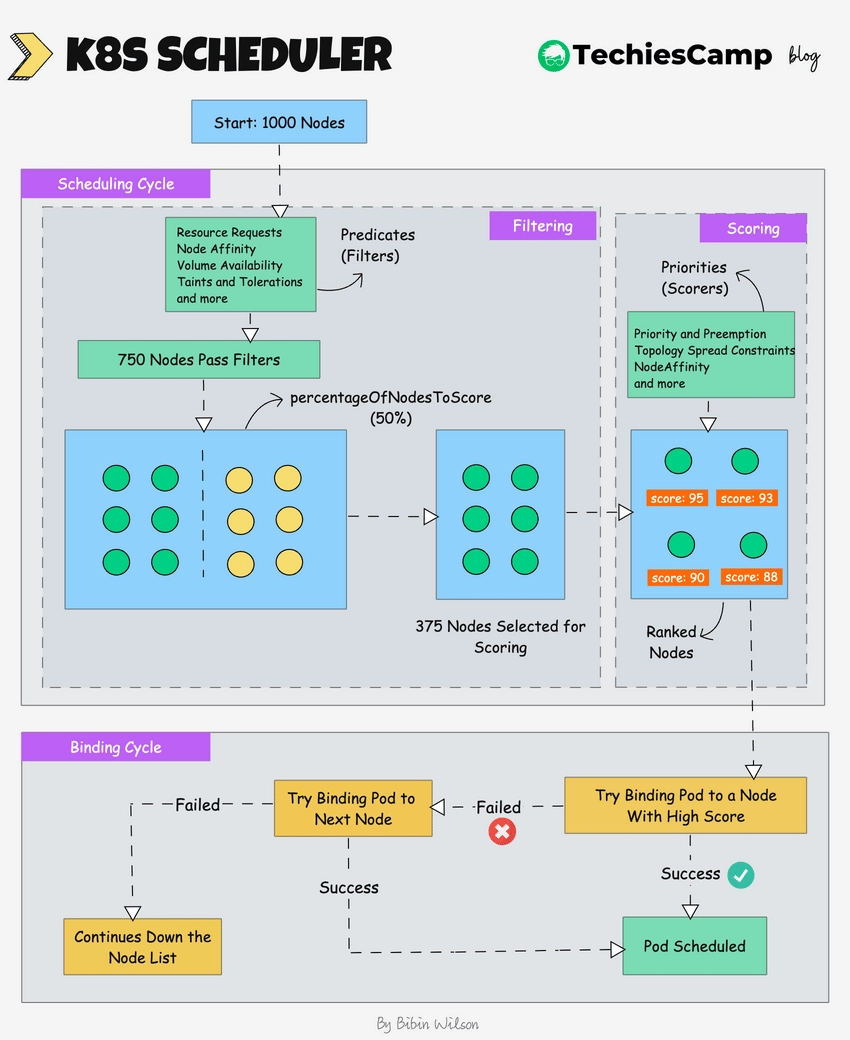
This image is from TechiesCamp's blog post. It shows the scheduling pipeline from a pending Pod to a bound node. The scheduler first filters out nodes that cannot run the Pod, then scores the remaining nodes, and finally binds the Pod to the selected node.
The important point is not memorizing every plugin. The important point is understanding the shape of the decision:
- Pick a pending Pod.
- Remove nodes that cannot run it.
- Rank the remaining nodes.
- Bind the Pod to the selected node.
I intentionally avoided writing manifests or code examples here. The goal of this post is to explain the theoretical side of scheduling and use Kubernetes as a familiar example for readers who have already seen cloud-native systems in practice.
Conclusion
Scheduling is a resource allocation problem. It appears at many layers of computing, from CPU process scheduling to distributed workload placement.
The filter-and-score model is a practical way to reason about schedulers because it separates hard constraints from preferences. Hard constraints decide what is possible. Scoring decides what is best among the possible options.
Kubernetes is a good real-world example because its scheduler exposes this logic through plugins and extension points. That design makes the scheduler flexible enough for many environments while still following a simple mental model: queue, filter, score, bind.
Extra Readings
- Kubernetes docs: Kubernetes Scheduler
- Kubernetes docs: Scheduling Framework
- Kubernetes docs: Scheduler Configuration
- Kubernetes docs: Pod Priority and Preemption
- Kubernetes docs: Node-pressure Eviction
- Where Did My Pod Go? A Deep Dive into Kubernetes Scheduling - Midhun K
- Scheduling (computing) - Wikipedia